
Nowadays, lot of sites have
advertisements on their pages for money. Some of them floating around our screen blocking our content and some contain those adults ads that hurt our kids.
So now, we can block them all by using Firefox and its addon - Adblock Plus !
But, remember to block only those big and flashy ads that
hinder your surfing. Some sites like me need to have some supports too !
=DFirst, get yourself a Firefox browser. Open it, and click on
Tools >
Add-ons.
A window will pop out, and click on
Gets Add-ons and search for
Adblock Plus.
Look on the results, and select
Add to Firefox...
After that, click on
Install.

After installation finish, restart Firefox and it is ready to go. Let have some simple blocking. =)
 Oh...ads !
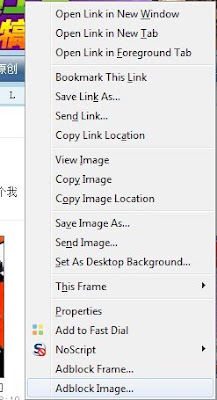 Select Adblock Frame or Adblock Image. This time I choose Adblock Frame.
 Pop out and Add filter.

Woot ! No more ads !


 Posts
Posts

